
Small business websites often answer only one side of the conversation. They explain services, show contact details, describe benefits, and invite visitors to request a quote. But they do not always help the business understand what visitors actually think.
This is where surveys become useful. A short survey can show why people hesitate, what information they were looking for, whether a service page was clear, or how satisfied customers were after working with the company.
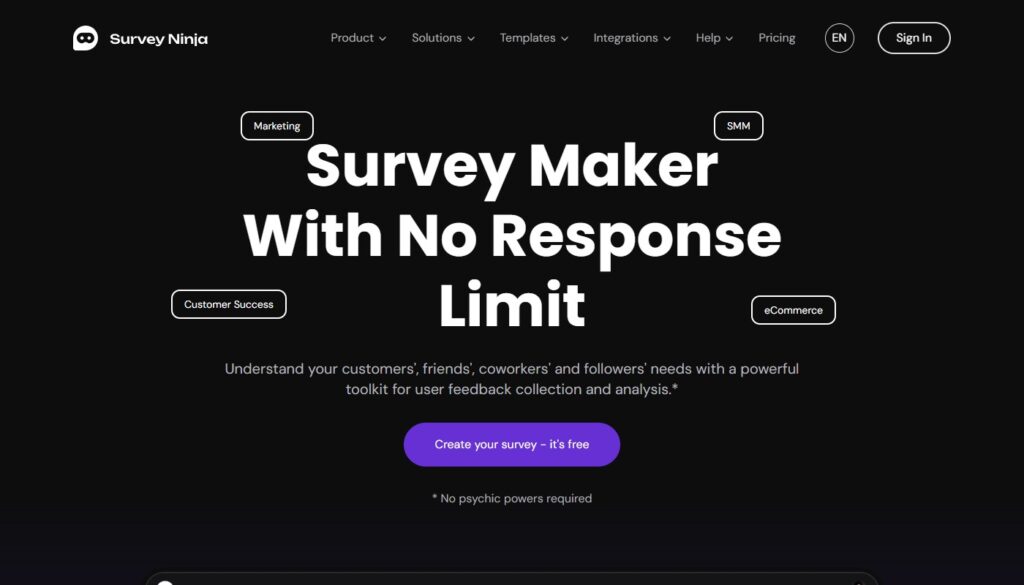
Survey Ninja is an online survey and questionnaire builder designed for creating surveys, polls, feedback forms, research questionnaires, registration forms, and tests without technical skills. The platform focuses on the full survey cycle: create a survey, publish it by link, embed it on a website or share it through other channels, collect responses, and analyze results.
What Is Survey Ninja?
Survey Ninja is a web-based tool for creating surveys and collecting responses. It can be used for customer feedback, marketing research, product research, audience studies, employee surveys, event feedback, and website experience checks.
For small business owners, the main value is simplicity. You do not need to build a custom form system or ask a developer to create a survey from scratch. You can prepare questions, publish the survey, and start collecting responses through a link, website embed, QR code, email invitation, or social media sharing.
This makes Survey Ninja useful not only for marketing teams, but also for local businesses, consultants, service companies, studios, and website owners who want to understand their audience better.
What Can You Create With Survey Ninja?
Survey Ninja can be used for different types of feedback and research. For a small business website, the most practical formats include customer satisfaction surveys, website feedback forms, quote request questionnaires, service interest surveys, post-project feedback forms, and simple market research questionnaires.
For example, a web design studio may use Survey Ninja to ask visitors what kind of website they need. A local repair company may ask customers how they found the service. A consultant may collect feedback after a call. A small shop may test interest in a new offer before launching it.
Survey Ninja also supports research-related scenarios such as marketing research, audience segmentation, feedback collection, and social media research.
Key Features
One of the useful Survey Ninja features is logic jumps. This means respondents can be directed to different questions depending on their answers. For example, if a visitor says they need a new website, they can see one follow-up question; if they choose redesign, they can see another. This keeps surveys more relevant and avoids showing unnecessary questions.
The platform also includes detailed summaries and visual analysis, so responses can be reviewed through charts and reports instead of only raw data. Survey Ninja also supports export to CSV, XLSX, and PDF, which can be useful when survey results need to be shared with a team or saved for later review.
Other helpful features include adaptive design, multiple survey elements, completion limits by date or number of submissions, tracking of incomplete responses, collaboration options, and integrations with Google Sheets and Slack.
Why Survey Ninja Can Be Useful for Small Business Websites
A small business website should help visitors make decisions. But business owners also need to learn from visitor behavior. Website analytics can show numbers, but surveys can explain reasons.
For example, analytics may show that people leave a service page quickly. A survey can ask what information was missing. Analytics may show that users visit the contact page but do not submit the form. A survey can ask what stopped them from contacting the company.
This is especially useful before a redesign. Instead of guessing what should be changed, the business can collect direct feedback and improve the website based on real answers.
Survey Ninja fits this kind of workflow because it can be embedded into a website, shared as a simple link, or distributed through other channels.
Practical Use Cases
Website Feedback Survey
A website feedback survey can ask visitors whether the page was clear, whether they found what they needed, and what information was missing. This is useful for improving homepage structure, service pages, contact blocks, and navigation.
Customer Satisfaction Survey
After completing a project or service, a business can send a short satisfaction survey. The answers may show what worked well and what needs improvement.
Lead Qualification Survey
Instead of a basic contact form, a business can use a short questionnaire to understand what the visitor needs. This is useful for consultants, designers, agencies, contractors, and service providers.
Product or Offer Research
Before launching a new service, a business can use a survey to test interest, collect expectations, and understand which features matter most.
Event or Appointment Feedback
For appointment-based businesses, workshops, consultations, or events, Survey Ninja can help collect quick feedback after the interaction.
Strengths of Survey Ninja
The main strength of Survey Ninja is that it keeps survey creation accessible. A small business owner can create a survey without technical skills and use it for practical feedback collection.
The second strength is flexibility. The same tool can be used for a simple one-page feedback form or a more structured questionnaire with logic paths.
The third strength is reporting. Built-in summaries and export options make it easier to turn answers into decisions instead of leaving them as disconnected form submissions.
The fourth strength is website compatibility. Since surveys can be shared by link or embedded into a website, the tool fits naturally into a business site, landing page, blog post, or customer feedback page.
Possible Limitations
Survey Ninja is useful for surveys and feedback, but it should not be treated as a replacement for a full customer relationship management system, advanced analytics platform, or complex research department.
If a company needs deep enterprise workflows, complex automation chains, or highly specialized research operations, it may need additional tools around the survey process.
For small businesses, this is usually not a major problem. In most cases, the priority is not building a complex research infrastructure. The priority is collecting useful answers, reviewing them quickly, and making better website or service decisions.
How to Use Survey Ninja on a Small Business Website
The best way to use Survey Ninja is to connect the survey with a clear purpose. Do not add a survey only because it is possible. Add it where feedback can improve the business.
For example, place a short feedback survey at the end of a service page. Add a “Was this page helpful?” survey to a blog article. Send a satisfaction survey after a completed project. Use a short questionnaire before a consultation to understand what the client needs.
A good survey should be short, focused, and easy to complete. Ask only what you plan to use. If the answers will not affect a decision, the question probably does not belong in the survey.
Example Survey Questions for a Website
A small business can start with simple questions:
Did you find the information you were looking for?
What was unclear on this page?
Which service are you most interested in?
What almost stopped you from contacting us?
How did you find our website?
Would you like us to follow up with more details?
How satisfied were you with your experience?
These questions can help improve website content, service pages, navigation, and customer communication.
Who Should Consider Survey Ninja?
Survey Ninja is a good fit for small businesses, website owners, marketers, consultants, service providers, educators, and teams that need a practical way to collect feedback.
It is especially useful for businesses that want to improve their website based on real user answers, not only assumptions. It can also help teams that regularly collect customer feedback but do not want a complicated technical setup.
For a web design studio, Survey Ninja can be useful before redesigning a client’s site. For a local business, it can help understand customer satisfaction. For a consultant, it can support lead qualification and post-call feedback.
Final Verdict
Survey Ninja is a practical survey builder for businesses that need a simple way to collect, organize, and analyze feedback. It supports common survey tasks, logic-based questionnaires, website embeds, sharing options, reporting, exports, and useful integrations.
For small business websites, the main benefit is clear: Survey Ninja helps turn a static website into a better feedback channel. Instead of guessing what visitors think, business owners can ask focused questions and use the answers to improve pages, services, and communication.
It is not a tool every website must use from day one. But when a business wants to understand customers better, improve its website, or collect structured feedback without custom development, Survey Ninja is a strong and practical option.